A smart lock with access logs can do more than replace your keys. It can show who entered, help you manage guests remotely, and provide a clearer record of activity at your front door.
This roundup compares 10 options with features such as Wi-Fi access, fingerprint recognition, keypad entry, auto-locking, voice-assistant support, and app-based user management.
Best 10 Smart Lock with Access Logs Picks for 2026
Best Matter-Ready Pick
ULTRALOQ Bolt SE Wi-Fi Smart Lock

- Stores up to 50 fingerprints and 50 codes
- Built-in Wi-Fi with activity history
- Matter over Thread support requires a hub
Best For: Flexible access management and Matter-enabled homes
Best Complete Handle Set
Philips Fingerprint Wi-Fi Door Lock

- Includes two lever handles
- App provides access history and alerts
- Supports up to 50 fingerprints and 100 user PINs
Best For: Full lock-and-handle replacements with guest access
Best for Large Households
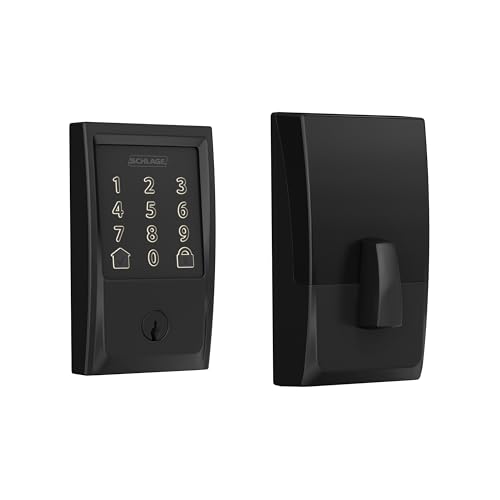
- Manages up to 100 access codes
- Provides lock history and custom alerts
- Includes alarm and BHMA-certified security
Best For: Homes and rentals with many keypad users
Best Fingerprint Value

- Six unlocking methods, including fingerprint
- Built-in Wi-Fi needs no bridge
- Includes notifications, auto-lock, and IP53 rating
Best For: Bridge-free biometric access and eufy ecosystem users
Best Wi-Fi Access Logging

- Real-time access history in the app
- Fingerprint entry and flexible PIN codes
- Built-in Wi-Fi with included handle set
Best For: Front doors needing remote monitoring and multiple entry methods
Best Weather-Resistant Option
Tapo DL100 Smart Wi-Fi Deadbolt

- Timestamped activity logs and real-time alerts
- Up to 200 customizable access codes
- IP54 weather resistance and BHMA Grade 3
Best For: Standard doors needing durable, trackable access control
Best for Multi-User Management
Veise VE017 Fingerprint Smart Lock

- Detailed logs with remote permission controls
- Eight unlocking methods and flexible code types
- Locally encrypted access data and event alerts
Best For: Rentals and multi-tenant properties with changing users
Fast Biometric Pick

- 0.5-second fingerprint unlocking
- Built-in Wi-Fi and Wyze app control
- Fingerprint, code, app, and key entry
Best For: Fast biometric entry at home
Code Management Pick

- Event history and real-time notifications
- Up to 100 custom passwords
- Built-in Wi-Fi with remote app control
Best For: Families, rentals, and guest access
Rental Access Pick

- Access records through the app
- Guest codes via app or web
- Optional gateway for remote access
Best For: Airbnb and rental-property management
Best Matter-Ready Pick – ULTRALOQ Bolt SE Wi-Fi Smart Lock
The ULTRALOQ Bolt SE is a versatile smart lock with access logs for households, rentals, and guest access. Built-in Wi-Fi supports remote control without a hub, while Matter over Thread adds broader smart-home compatibility when paired with a compatible Thread Border Router.
Best For: Buyers who want fingerprint entry, flexible guest credentials, remote access, and Matter integration.
Pros:
- Supports up to 50 fingerprints and 50 access codes, with activity history and real-time notifications.
- Offers built-in Wi-Fi remote control, scheduled or temporary eKeys, and voice control.
- Includes auto-lock, two mechanical keys, IP65 weather resistance, and an 18-month stated battery life.
Cons:
- Matter remote access requires a compatible Matter over Thread hub.
- Wi-Fi operates on 2.4 GHz only, and a door sensor is not included.
This is a strong choice when detailed access management is a priority. Its combination of local biometric entry, app controls, and event history is especially useful for managing family members, guests, or service providers.
Best Complete Handle Set – Philips Fingerprint Wi-Fi Door Lock
The Philips Fingerprint Door Lock combines a touchscreen lock with two lever handles and app-based access history. Its Wi-Fi connection supports remote locking, unlocking, permission management, and alerts, making it a practical smart lock with access logs for homes and rental properties.
Best For: Buyers replacing both a lock and handles who want fingerprint entry and app-managed guest access.
Pros:
- Provides access history, real-time notifications, and remote control through the Philips app.
- Offers fingerprint, PIN, key, and app unlocking, with capacity for up to 50 fingerprints.
- Includes two lever handles and supports up to 100 user PINs plus one-time PINs.
Cons:
- The lock has no door sensor, so the door must be fully closed for auto-lock to engage properly.
- Timed and recurring PINs require the Philips Wi-Fi Gateway, sold separately.
- Battery life is listed at up to nine months.
The included handles make this more of a complete door-hardware upgrade than a simple deadbolt replacement. It is well suited to users who value multiple entry methods and centralized access records, provided the gateway limitation fits their setup.
Best for Large Households – Schlage Encode Wi-Fi Deadbolt
The Schlage Encode is a dependable smart lock with access logs for households that need many unique codes. Its built-in Wi-Fi enables remote management through the Schlage Home app, including lock history, customizable notifications, and control of up to 100 access codes.
Best For: Families, rentals, and multi-user homes that need a high code limit and established security features.
Pros:
- Stores up to 100 access codes and provides lock history through the Schlage Home app.
- Includes customizable notifications, remote access, auto-lock, and Alexa and Google Home support.
- Offers a built-in customizable alarm, encrypted connection, and highest residential BHMA security rating.
Cons:
- Typical battery life is listed at up to six months.
- Voice control requires the Schlage Home app and a compatible voice-enabled device.
- Entry options are centered on the touchscreen keypad and included physical backup key rather than fingerprint access.
Choose the Encode when code capacity and security certification matter more than biometric entry. Its access history and notification controls make it particularly practical for tracking frequent household or guest access.
Best Fingerprint Value – eufy Security Smart Lock C220
The eufy Security Smart Lock C220 is a compact smart lock with access logs that combines fingerprint recognition, keypad entry, and built-in Wi-Fi. The eufy Security app supports remote control and real-time notifications without requiring a bridge, while integration with eufy doorbells can add routine-based control.
Best For: Buyers who want fingerprint access, remote app control, and straightforward installation without a separate bridge.
Pros:
- Offers six unlocking methods, including fingerprint, app, keypad, physical key, Apple Watch, and voice control.
- Built-in Wi-Fi enables remote access without a bridge and supports real-time notifications.
- Includes auto-lock, an eight-month stated battery life, BHMA Grade 3 certification, and IP53 water resistance.
Cons:
- Battery life is listed at around eight months and varies with usage.
- Its access-history details are less specifically described in the supplied notes than its notifications and remote-control features.
- Voice control depends on Alexa or Google Assistant.
The C220 is a practical option for shoppers prioritizing convenient biometric entry and simple connectivity. Its bridge-free Wi-Fi and broad unlocking choices make it flexible, while eufy users can connect it with compatible doorbell routines.
Best Wi-Fi Access Logging – Philips WiFi Keypad Deadbolt
The Philips WiFi Keypad Deadbolt is a practical smart lock with access logs for homeowners who want remote control and several keyless entry options. Its app provides real-time lock status and access history, while built-in Wi-Fi eliminates the need for a separate hub.
Best For: Front-door users who want fingerprint entry, flexible codes, remote monitoring, and an included handle set.
Pros:
- Tracks access history and provides real-time app monitoring.
- Supports permanent, one-time, periodic, and recurring PIN codes.
- Offers fast fingerprint unlocking, voice assistant support, and adjustable auto-lock.
- Includes a matching door lever and installs with a screwdriver on compatible doors.
Cons:
- Works with 2.4GHz Wi-Fi and should remain within 33 feet of the router.
- Batteries are not included, and the manufacturer recommends standard alkaline batteries.
- Left-opening doors require resetting the lock direction.
Choose this model if access history and broad code-management options matter as much as convenient biometric entry. The included handle makes it a useful all-in-one upgrade, provided your door and Wi-Fi setup meet the requirements.
Best Weather-Resistant Option – Tapo DL100 Smart Wi-Fi Deadbolt
The Tapo DL100 is a smart lock with access logs designed for straightforward household access management. The Tapo app records activity with timestamps, sends real-time alerts, and supports remote locking or unlocking over Wi-Fi.
Best For: Standard doors where weather resistance, large code capacity, and app-based activity tracking are priorities.
Pros:
- Tracks who accessed the home and when with timestamped activity records.
- Supports up to 200 customizable codes and grouped access for family or guests.
- Offers auto-lock, failed-attempt lockout, anti-peeping passwords, and emergency USB-C power.
- Includes four AA batteries, backup keys, IP54 weather resistance, and BHMA Grade 3 certification.
Cons:
- Voice unlocking requires PIN verification.
- Battery life varies by connection mode, with Wi-Fi use rated up to 200 days.
- Compatibility depends on standard 2-1/8-inch and 1-1/2-inch lock-hole sizes.
The DL100 is a balanced choice for buyers who want detailed access records without giving up physical-key backups. Its weather-resistant construction and security controls add practical flexibility for everyday front-door use.
Best for Multi-User Management – Veise VE017 Fingerprint Smart Lock
The Veise VE017 is a smart lock with access logs focused on detailed user administration. Through the KK Home App, owners can grant, change, pause, or delete permissions remotely, while activity logs show who accessed the property and when.
Best For: Multi-tenant properties, rentals, and households that need granular permissions, temporary codes, and locally encrypted access data.
Pros:
- Provides detailed activity logs and remote user-permission management.
- Supports fingerprints, app access, codes, fob cards, mechanical keys, and authorized sharing.
- Offers one-time, duration, permanent, and recurring password modes.
- Stores access data locally with AES-128 encryption and provides event alerts.
Cons:
- Alexa and Google Assistant compatibility requires the optional G1 Gateway.
- Remote management depends on the KK Home App and its connectivity setup.
- The supplied notes specify alkaline AA batteries but do not state the complete battery-life rating.
This is the strongest fit when access logs are part of a broader property-management workflow. Its permission controls, temporary-code support, and local data storage are especially useful for owners managing multiple users.
Fast Biometric Pick – Wyze Auto-Lock Bolt v2
If you want a smart lock with access logs and quick everyday entry, the Wyze Auto-Lock Bolt v2 combines fingerprint unlocking with built-in Wi-Fi and app control. Its AI-learning scanner, auto-lock feature, and multiple backup methods make it a flexible choice for a home front door.
Best For: Homeowners who prioritize fast fingerprint entry, remote app control, and flexible backup access.
Pros:
- Fingerprint scanner can unlock the door in about 0.5 seconds and improves recognition over time.
- Built-in Wi-Fi enables remote lock management and checking through the Wyze app.
- Offers fingerprint, app, code, and physical-key entry options.
- Includes auto-lock, scratch- and smudge-resistant tempered glass, and USB-C emergency power.
Cons:
- Its advertised battery life is up to eight months, so batteries still require periodic replacement.
- Remote features are most useful within the Wyze app ecosystem.
The Wyze model stands out for fast biometric access and several ways to get inside if one method is inconvenient. It is a practical fit when convenience and app-based control matter more than creating a large set of specialized user codes.
Code Management Pick – Philips Smart Lock with Wi-Fi
For shoppers seeking a smart lock with access logs, the Philips Smart Lock pairs built-in Wi-Fi with event history, real-time notifications, and flexible password management. It supports up to 100 custom passwords, including permanent, one-time, and timed codes.
Best For: Families, landlords, and hosts who need remote control and multiple scheduled or temporary access codes.
Pros:
- Built-in Wi-Fi supports remote control through the Philips Home Access App.
- Provides event history, real-time notifications, and access permissions.
- Supports up to 100 permanent, one-time, or timed passwords.
- Works with keys, passcodes, the app, Alexa, and Google Assistant.
Cons:
- Eight AA batteries are required but are not included.
- Battery life is rated up to six months at 20–30 uses per day.
- Voice unlocking requires pairing with Alexa or Google Assistant.
The Philips is especially compelling when access administration is the priority. Its password types and event history are useful for managing family, guest, tenant, or cleaner entry, while the auto-lock timer adds a practical layer of convenience.
Rental Access Pick – Sifely Fingerprint Door Lock
This Sifely fingerprint door lock is a useful smart lock with access logs for homes, rentals, and Airbnb properties. It combines fingerprint, keypad, app, fob, and key entry, while its app can display access records and manage users.
Best For: Airbnb hosts, rental-property managers, and families who want several entry methods with optional remote access.
Pros:
- Supports fingerprint, keypad, app, fob, and physical-key unlocking.
- App and web tools can generate guest access codes and review access records.
- Designed for DIY installation on most standard doors without extra drilling.
- Optional Sifely Wi-Fi Gateway enables remote unlocking and Alexa or Google compatibility.
Cons:
- Remote unlocking and voice control require the optional Sifely Wi-Fi Gateway.
- Without the gateway, connectivity is based on Bluetooth rather than built-in Wi-Fi.
- The product has a one-year warranty.
The Sifely is the most rental-oriented option here, with access records, guest-code tools, and support for multiple users. Buyers should budget for the optional gateway if they need true anywhere access or voice-assistant integration.
How We Picked the Best Smart Lock with Access Logs
We focused on models that support app-based access management or activity monitoring, since those features are central to choosing a Smart Lock with Access Logs. We also considered entry methods, remote connectivity, battery claims, smart-home compatibility, weather resistance, installation style, and backup access.
Because manufacturers describe logging and notifications differently, check the companion app’s current feature list before buying. Some locks may record unlock events, while others add user names, temporary codes, alerts, or remote activity history.
Quick Comparison
| Feature | What to look for | Why it matters |
|---|---|---|
| Access history | Named users, timestamps, notifications | Makes household and guest activity easier to verify |
| Connectivity | Built-in Wi-Fi or a required hub | Determines whether remote control works away from home |
| Entry methods | Keypad, fingerprint, app, key, or voice | Provides convenient alternatives when one method fails |
| Power | Battery-life estimate and low-power alerts | Helps prevent lockouts and maintenance surprises |
| Smart-home support | Alexa, Google Home, Apple Home, or Matter | Improves routines and voice-control compatibility |
Key Buying Factors for a Smart Lock with Access Logs
Logging and User Controls
Look for a clear activity timeline, individual user profiles, temporary permissions, and instant alerts. If you manage cleaners, relatives, renters, or deliveries, scheduled codes and revocable access can be more useful than fingerprint entry alone.
Wi-Fi, Hubs, and Remote Access
Built-in Wi-Fi is convenient, but it can use more battery power. Hub-based systems may offer better efficiency or broader protocols. Confirm whether remote unlocking, notifications, and history require a subscription or additional bridge.
Installation and Door Compatibility
Check the lock type, backset, door thickness, handle configuration, and clearance around the deadbolt. A retrofit deadbolt is not automatically compatible with every existing cylinder or multipoint door. Measure first and follow the manufacturer’s template.
Security and Backup Entry
Choose a lock with dependable encryption, firmware updates, tamper alerts where available, and a practical backup method. A physical key, emergency power option, or offline keypad can be important during outages or depleted batteries.
Battery and Outdoor Durability
Battery estimates vary with temperature, Wi-Fi strength, usage, and fingerprint scanning. Favor low-battery warnings and easy battery access. For exposed doors, verify the stated weather-resistance rating rather than assuming every exterior smart lock has the same protection.
Who Should Buy Which Smart Lock with Access Logs?
Choose a Wi-Fi model with detailed app history if remote monitoring and guest management are your top priorities. A fingerprint-equipped lock suits busy households that want fast keyless entry, while a keypad-focused model is often better for families sharing codes or managing short-term access.
Buyers invested in Apple Home, Alexa, Google Home, or Matter should verify exact platform support before installation. For rentals and Airbnb properties, prioritize temporary credentials, user management, audit history, and remote control. If reliability during internet outages matters most, select a model with local keypad or fingerprint access and a dependable physical backup.