Smart locks with fingerprint access make coming home faster while reducing dependence on keys and memorized codes. The best models combine reliable biometric unlocking with practical features such as app control, auto-locking, temporary passcodes, and useful battery life.
We compared front-door deadbolts, handle locks, and budget-friendly keypad models to help you choose the right balance of security, convenience, connectivity, and installation flexibility for your home or rental property.
Best 10 Smart Locks with Fingerprint Picks for 2026
Best Wi-Fi Fingerprint Upgrade

- About 0.5-second fingerprint unlocking
- Built-in Wi-Fi and Wyze app control
- Up to eight months of battery life
Best For: Homeowners wanting remote control and flexible entry options
Best Interior Fingerprint Lever
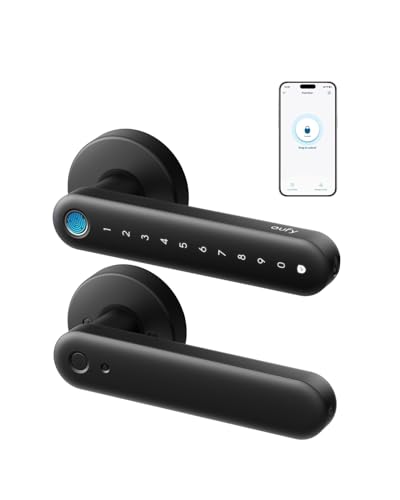
- About 0.3-second fingerprint unlocking
- Built-in Wi-Fi with app management
- Alexa and Google Assistant compatibility
Best For: Bedrooms, offices, garages, and other interior doors
Best Budget Keypad Fingerprint Deadbolt
TEEHO TE002 Fingerprint Deadbolt

- Supports up to 20 fingerprints and codes
- Anti-peep PINs and one-time access codes
- IP54 and BHMA Grade 3 rated
Best For: Exterior doors needing local, app-free access control
Best All-Around Front Door Lock

- Six unlocking methods, including fingerprint
- Built-in Wi-Fi with no bridge required
- Up to eight months of battery life
Best For: Front doors needing flexible entry and remote management
Best Overall
Tapo DL110 Fingerprint Smart Lock

- Unlocks in about 0.42 seconds and stores up to 100 fingerprints
- Wi-Fi, Bluetooth, app, keypad, voice, and key access
- Rechargeable battery lasts up to one year
Best For: Feature-rich home access with scheduled guest entry
Best for Rentals
Sifely Fingerprint Smart Lock with Handle

- Supports fingerprint, keypad, app, FOB, key, and key cards
- Creates guest codes and provides remote access logs
- DIY-friendly reversible handle design
Best For: Airbnb hosts, families, and rental-property access
Best Security Controls
Veise VE017 Fingerprint Smart Lock

- AI fingerprint recognition unlocks in under 0.2 seconds
- Local AES128 encryption, alerts, and activity logs
- Supports flexible temporary, recurring, and permanent codes
Best For: Managed properties and security-conscious households
Best Flexible Entry

- Six entry methods, including fingerprint and app access
- Remote passcodes and activity tracking through the app
- DIY installation with reversible handle
Best For: Landlords, rental hosts, and households wanting multiple entry options
Best for Advanced Access Control
Veise VE017 Fingerprint Smart Lock

- Self-learning fingerprint recognition with rapid verification
- Flexible one-time, recurring, temporary, and permanent codes
- Local AES-128 encrypted storage for access data
Best For: Multi-user households and property managers needing detailed permissions
Best Wi-Fi Fingerprint Upgrade – Wyze Lock Bolt v2
For shoppers comparing smart locks with fingerprint access, the Wyze Lock Bolt v2 combines quick biometric entry with built-in Wi-Fi and app control. Its AI-learning scanner is designed to improve recognition over time, while the tempered-glass surface resists scratches and smudges.
Best For: Homeowners who want remote control, fingerprint entry, and multiple backup unlocking methods.
Pros:
- Unlocks in about 0.5 seconds and learns from repeated use.
- Built-in Wi-Fi supports remote lock management through the Wyze app.
- Includes auto-lock, keypad access, physical keys, and USB-C emergency power.
- Eight AA batteries are rated for up to eight months of use.
Cons:
- Its 1.47 kg weight may be substantial compared with simpler locks.
- Remote and voice-control features depend on the Wyze app and connected setup.
The Wyze Lock Bolt v2 is a well-rounded front-door option for users who prioritize fast fingerprint recognition without giving up app-based access or physical-key backup.
Best Interior Fingerprint Lever – eufy FamiLock C32
The eufy FamiLock C32 is a practical choice among smart locks with fingerprint access for interior doors. Its large fingerprint sensor, built-in Wi-Fi, and voice-assistant compatibility make it suited to bedrooms, offices, storage areas, and other standard interior doors.
Best For: Interior rooms where fast fingerprint access and remote authorization are more important than front-door use.
Pros:
- Large-area sensor unlocks in about 0.3 seconds with 360-degree recognition.
- Self-learning fingerprint software supports multiple users.
- Built-in 2.4 GHz Wi-Fi enables remote management through the app.
- Works with Alexa and Google Assistant and installs with a screwdriver.
Cons:
- The manufacturer does not recommend it for front doors.
- Rekeying is not supported.
- Four AA batteries last over five months, which is shorter than some listed alternatives.
With its lever-style design and interior-focused fit, the C32 makes the most sense for controlled-access rooms rather than exterior entry points.
Best Budget Keypad Fingerprint Deadbolt – TEEHO TE002 Fingerprint Deadbolt
The TEEHO TE002 is a straightforward option for shoppers seeking smart locks with fingerprint access without connected Wi-Fi features. It pairs one-second fingerprint unlocking with keypad codes, one-time PINs, physical keys, anti-peep password entry, and automatic locking.
Best For: Front, back, side, or rental doors where local keypad and fingerprint access are sufficient.
Pros:
- Stores up to 20 fingerprints and 20 passcodes, plus one-time PINs.
- Offers auto-lock timing from 10 to 99 seconds and one-touch locking.
- Includes anti-peep passwords, wrong-entry lockout, silent mode, and away mode.
- IP54 weather resistance and BHMA Grade 3 certification support exterior use.
Cons:
- Four AA batteries are not included.
- It has no app, Wi-Fi, or remote-control connectivity.
- Compatibility is limited to doors with 2-1/8-inch holes.
The TE002 favors simple, local access control over smart-home integration, making it a useful fit for households that want fingerprint entry and temporary codes without managing an app.
Best All-Around Front Door Lock – eufy Smart Lock C220
The eufy Smart Lock C220 is a versatile pick among smart locks with fingerprint access for front doors. It offers six unlocking methods, built-in Wi-Fi, self-learning fingerprint recognition, and integration with the eufy ecosystem, Alexa, and Google Assistant.
Best For: Front-door users who want fingerprint entry alongside app, keypad, voice, wearable, and physical-key access.
Pros:
- Fingerprint access opens the lock in less than one second.
- Six unlocking methods include fingerprint, app, keypad, key, Apple Watch, and voice control.
- Built-in Wi-Fi enables remote control without a bridge.
- Eight AA batteries are rated for around eight months, with IP53 and BHMA Grade 3 protection.
Cons:
- Battery life varies with how frequently the lock is used.
- Installation compatibility depends on the existing deadbolt and bore size.
The C220 stands out for breadth: it gives households several ways to enter while adding remote management and eufy ecosystem routines in a front-door deadbolt format.
Best Overall – Tapo DL110 Fingerprint Smart Lock
The Tapo DL110 is a well-rounded choice among smart locks with fingerprint access, combining rapid biometric unlocking with Wi-Fi monitoring, scheduled entry, and several backup methods. Its rechargeable battery and BHMA Grade 2 rating add practical convenience for everyday home use.
Best For: Homeowners who want fingerprint entry, remote management, and flexible access options in one deadbolt.
Pros:
- Recognizes fingerprints in about 0.42 seconds and stores up to 100 fingerprints.
- Offers fingerprint, passcode, Wi-Fi, Bluetooth, voice assistant, and key access.
- Removable rechargeable battery provides up to one year of operation.
- Supports resident profiles plus one-time and scheduled guest codes.
Cons:
- Its broad feature set may be more than needed for shoppers seeking a basic fingerprint lock.
- Wi-Fi and voice-control features may require additional setup through the app or compatible assistant.
Choose the Tapo DL110 if you want a feature-rich fingerprint deadbolt with long battery life and detailed access management. It is especially appealing for households that regularly share entry with guests or multiple residents.
Best for Rentals – Sifely Fingerprint Smart Lock with Handle
This Sifely model is a practical option among smart locks with fingerprint recognition when you need a handle-style entry solution for a home, rental, or Airbnb. It combines biometric access with app management, guest codes, key cards, and optional remote connectivity.
Best For: Families, Airbnb hosts, and rental-property managers who need flexible user access and entry records.
Pros:
- Supports fingerprint, keypad, app, FOB, key, and key-card entry.
- Guest codes can be generated through the app or web, with remote access logs.
- Designed for DIY installation on most standard doors without extra drilling.
- Includes reversible handle functionality for left- or right-handed doors.
Cons:
- Remote access and voice control require the optional Sifely Wi-Fi Gateway.
- The handle-style design may not suit doors set up for a traditional deadbolt-only lock.
- Its listed color is red, while the finish is satin nickel, so buyers should verify the appearance before ordering.
The Sifely stands out for access sharing and rental use rather than maximum biometric speed. It is a sensible pick when multiple people need different entry methods and remote management is important.
Best Security Controls – Veise VE017 Fingerprint Smart Lock
The Veise VE017 is built for shoppers comparing smart locks with fingerprint access and advanced user controls. Its on-device fingerprint processing, local AES128-encrypted data storage, flexible password modes, and detailed activity alerts make it a strong fit for homes and multi-tenant properties.
Best For: Property managers and security-conscious households that need granular permissions, logs, and temporary access codes.
Pros:
- AI fingerprint recognition unlocks in under 0.2 seconds with stated 99.99% accuracy.
- Supports fingerprint, app, codes, fob card, shared codes, mechanical key, and compatible voice assistants.
- Offers permanent, recurring, duration, and one-time password modes.
- Stores access data locally with AES128 encryption and provides event alerts and activity logs.
Cons:
- Alexa and Google Assistant compatibility requires the G1 Gateway.
- The extensive management and security settings may require more setup than a basic smart lock.
- The supplied notes indicate at least 12 months of battery life but do not specify the complete battery details.
The VE017 is the most control-focused option in this group. Its combination of rapid fingerprint recognition, local data protection, configurable codes, and user-permission tools makes it particularly useful where access needs to be monitored and adjusted frequently.
Best Flexible Entry – Yamiry Fingerprint Knob Lock
For shoppers comparing smart locks with fingerprint access, the Yamiry YR01 stands out for its broad choice of entry methods and straightforward retrofit design. It combines fingerprint recognition, app control, passcodes, key fobs, mechanical keys, and optional Alexa control when paired with a separately sold Wi-Fi gateway.
Best For: Homeowners, landlords, and short-term rental managers who want flexible access options and app-based user management.
Pros:
- Offers six core entry methods, including fingerprint, app, passcode, fob, and mechanical key access.
- Supports permanent and temporary access, remote one-time passcodes, and unlock-history tracking through the app.
- Designed for DIY installation in about 10 minutes on most standard American wooden doors, with a reversible handle.
- Includes passage mode and auto-lock functionality.
Cons:
- Remote control and Alexa voice unlocking require a separately sold Wi-Fi gateway.
- Its app and access-management features may be more than needed for a basic single-user door.
The Yamiry is a practical choice when convenience and multiple backup entry methods matter. Its retrofit-friendly installation and property-management tools make it especially useful for rental access, while the separate gateway requirement should be considered if remote connectivity is essential.
Best for Advanced Access Control – Veise VE017 Fingerprint Smart Lock
The Veise VE017 is a feature-rich option for shoppers seeking smart locks with fingerprint recognition and detailed access controls. Its on-device fingerprint system, local encrypted data storage, configurable codes, and remote user management make it suited to households and multi-tenant properties that need more granular control.
Best For: Multi-user homes, landlords, and property managers who need detailed permissions, entry records, and flexible code types.
Pros:
- Uses self-learning fingerprint recognition that is advertised to verify access in under 0.2 seconds with 99.99% accuracy.
- Supports permanent, recurring, temporary, and one-time codes, plus anti-peeping PIN entry.
- Stores fingerprints, credentials, and entry records locally with AES-128 encryption.
- Offers auto-lock settings from 0 to 180 seconds and includes alerts, intrusion protection, and an away mode.
Cons:
- Alexa and Google Assistant compatibility requires the separately sold G1 gateway.
- The extensive management and security features may feel complex for users wanting a basic fingerprint lock.
- The supplied notes indicate operation with four AA batteries but do not specify the complete battery-life figure.
The VE017 is a strong fit when access administration and privacy are priorities. Its local data storage and varied credential options add reassurance, while the gateway requirement for voice control and its more advanced setup may matter to less technical buyers.
Best Simple Knob Retrofit – Tuya Fingerprint Door Knob Lock
For buyers looking for a compact way to add smart locks with fingerprint entry, this Tuya-compatible door knob offers app control, keypad access, NFC cards, and a mechanical-key backup. Its no-drilling installation is designed for compatible wooden doors, making it a practical option for bedrooms, apartments, and front-door applications.
Best For: Indoor users and renters with compatible wooden doors who want quick installation and basic app-managed access.
Pros:
- Combines fingerprint, keypad, NFC card, app, and mechanical-key unlocking.
- Claims fingerprint unlocking in about 0.5 seconds.
- Supports permanent and temporary app access, entry logs, silent mode, and auto-lock.
- Installs without drilling or wiring on 1.18- to 1.97-inch-thick wooden doors and accommodates left- or right-swing doors.
Cons:
- The lock is listed for indoor use, so exterior-door suitability should be confirmed for the intended installation.
- An administrator fingerprint must be registered before first use; until then, any fingerprint can unlock the door.
- The USB port provides emergency power from an external power bank but does not recharge the internal batteries.
This lock makes sense for buyers prioritizing easy installation and multiple everyday unlocking methods. Pay close attention to the door-thickness requirements and complete administrator setup immediately to avoid the initial unrestricted fingerprint access.
How We Picked the Best Smart Locks with Fingerprint Access
We focused on the features that matter most in daily use: fingerprint recognition, keypad reliability, mechanical security, battery expectations, app functionality, remote access, auto-lock options, and installation requirements. We also considered whether each lock is better suited to a standard exterior deadbolt, a full handle assembly, an interior door, or a rental application.
Because specifications can vary by configuration, check the current listing for compatibility with your door thickness, backset, borehole, operating system, and required hub or Wi-Fi connection before ordering.
Quick Comparison
| Best For | Recommended Type | Features to Prioritize |
|---|---|---|
| Most connected homes | Wi-Fi smart deadbolt | Remote app control, alerts, scheduled access |
| Simple keyless entry | Fingerprint keypad deadbolt | Fast biometric unlocking, local codes, auto-lock |
| Rentals and guests | App-enabled lock | Temporary passcodes, user management, activity logs |
| Interior rooms | Fingerprint knob or handle | Correct lock type, compact design, simple setup |
| Budget upgrades | Standalone keypad lock | Low installation cost, emergency key access, battery life |
Key Buying Factors for Smart Locks with Fingerprint
Door and Lock Compatibility
Confirm that the model matches your existing deadbolt or handle opening. Exterior deadbolts and interior knobs are not interchangeable, and some products replace the entire lock rather than fitting over existing hardware.
Fingerprint Performance
Look for fast recognition, multiple user profiles, and the ability to store several fingerprints per person. A keypad and physical key backup are valuable when a finger is wet, dirty, injured, or not recognized.
Connectivity and Access Control
Bluetooth may be sufficient for local unlocking, while built-in Wi-Fi enables remote control, notifications, scheduled codes, and activity monitoring without an additional bridge. Verify whether remote features require a subscription or separate hub.
Security and Power
Prefer a sturdy exterior body, dependable deadbolt mechanism, encrypted app connections, and clear low-battery warnings. Battery life depends on usage, temperature, Wi-Fi activity, and alignment. Keep the emergency key or backup power procedure accessible.
Who Should Buy Which Smart Locks with Fingerprint?
Choose a Wi-Fi-enabled deadbolt if you want remote monitoring, guest management, and smart-home integration. A keypad fingerprint deadbolt is a better fit for straightforward family access without depending heavily on an app. Hosts and landlords should prioritize temporary codes, user controls, and access logs. For bedrooms, offices, or apartments where a deadbolt is unsuitable, select a handle or knob model designed for that door type.
Finally, measure before buying and treat biometric access as a convenience layer—not a replacement for sound door alignment, strong strike-plate installation, and sensible account security.